- Process
- Process is what a program does to its input data, such as calculations, decisions or sorting.
- Output
- Output is what comes back from a program: data shown on screen, printed, sent or saved, or a sound.
- Linear search
- A linear search checks each item in turn, from the first, until it finds what it is looking for or runs out of items; it works on any list, sorted or not.
- Binary search
- A binary search only works on a sorted list: it compares the target with the middle item, then throws away the half that cannot hold the target.
- Logic gates
- Logic gates have inputs and an output that are each 1 (true, on) or 0 (false, off); every decision inside a computer is built from logic gates.
- AND (logic gate)
- AND is a logic gate whose output is 1 only when both inputs are 1.
- OR (logic gate)
- OR is a logic gate whose output is 1 when at least one input is 1.
- XOR (logic gate)
- XOR (exclusive OR) is a logic gate whose output is 1 when the inputs are different.
- NOT (logic gate)
- NOT is a logic gate with one input, whose output is the input flipped.
- Expression
- An expression describes a circuit in writing, where one gate's output becomes another's input.
- CPU
- The CPU (central processing unit) fetches and carries out instructions.
- ALU
- The ALU (arithmetic logic unit) does the calculations and comparisons in the CPU.
- Control unit
- The control unit is the part of the CPU that decodes instructions and sends signals to make the other parts act, in step with the clock.
- Cache
- Cache is a small amount of very fast memory on or near the CPU.
- Registers
- Registers are tiny, very fast stores inside the CPU, each with one job.
- Von Neumann architecture
- The von Neumann architecture stores program instructions and data together in the same main memory, and the CPU fetches them one at a time.
- Buses
- Buses connect the CPU to memory: the address bus carries addresses, the data bus carries data and the control bus carries signals such as read and write.
- Clock speed
- Clock speed is the speed of the CPU's clock, in cycles per second (hertz): 3.2 GHz is 3 200 000 000 cycles a second; a faster clock means more instructions a second, but more heat.
- Cores
- Each core is a separate processor, so several cores can work on different tasks at once.
- Embedded system
- An embedded system is a computer built into a larger device to do one dedicated job, such as a washing machine's controller or a thermostat.
- Binary
- Binary is base 2: it uses only the digits 0 and 1, each place value worth twice the one to its right; computers store everything as binary because a circuit is either off or on.
- Hexadecimal
- Hexadecimal is base 16, using the digits 0 to 9 and then A to F for 10 to 15.
- Binary prefixes
- Binary prefixes are units whose names say they use 1024 instead of 1000, because 1024 = 2^10.
- Kibibyte
- A kibibyte (KiB) is 1024 bytes.
- Mebibyte
- A mebibyte (MiB) is 1024 KiB, which is 1024 x 1024 bytes.
- Gibibyte
- A gibibyte (GiB) is 1024 MiB.
- Tebibyte
- A tebibyte (TiB) is 1024 GiB.
- Overflow
- Overflow is when a result needs more bits than there are, so in an 8-bit register the ninth bit is lost and the stored answer is wrong.
- Left shift
- A left shift moves every bit left and fills the gap on the right with 0; each place multiplies the value by 2.
- Right shift
- A right shift moves every bit right, filling with 0 on the left; each place divides by 2, and the result rounds down.
- Database
- A database is an organised, permanent store of data that can be searched, sorted and updated.
- Tables
- A table is made of records and fields: each row is a record and each column is a field; the data in a database sits in tables.
- Record
- A record is one row in a database table, such as everything stored about one film.
- Record (in a program)
- A record in a program groups related fields, which can have different data types.
- Field
- A field is one column in a database table: one piece of data stored for every record.
- Primary key
- A primary key is a field whose value is different for every record, so it identifies each one.
- Relational database
- A relational database keeps data in separate tables linked by keys.
- Foreign key
- A foreign key is a field in one table that holds the primary key of another table.
- Data redundancy
- Data redundancy is the same data stored more than once.
- Data inconsistency
- Data inconsistency is when the same data is stored more than once and one copy is changed but another is missed.
- 2D array
- A 2D array holds a table in a program: a table of records can be held in a 2D array, with one row per record and one column per field.
- SQL
- SQL (structured query language) is a language that asks questions of a database.
- SELECT
- SELECT names the fields to show in an SQL query; SELECT * shows every field.
- FROM
- FROM is the part of an SQL query that names the table.
- WHERE
- WHERE keeps only the records that meet a condition in an SQL query.
- ORDER BY
- ORDER BY sorts the result of an SQL query, in ASC (the default) or DESC order.
- ASC
- ASC sorts smallest, earliest or A first, and is the default for ORDER BY.
- DESC
- DESC sorts largest, latest or Z first in ORDER BY.
- % (SQL wildcard)
- The % wildcard in SQL stands for any number of characters, even none, when LIKE matches a pattern.
- _ (SQL wildcard)
- The _ wildcard in SQL stands for exactly one character when LIKE matches a pattern.
- Stakeholders
- Stakeholders are the different people who feel the benefits and costs of technology.
- Privacy
- Privacy is about data people may not want shared, collected by location tracking, smart speakers, face recognition and monitoring at work.
- Fairness
- Fairness means important decisions should be explainable and open to challenge, since an AI trained on biased data repeats the bias.
- Jobs (impact of technology)
- Automation removes some jobs and creates others with different skills.
- Wellbeing (impact of technology)
- Wellbeing is the impact of technology on people, through screen time, cyberbullying and designs that keep people scrolling or spending.
- Culture and access
- Culture and access is about the digital divide and accessibility features such as screen readers and captions.
- Digital divide
- The digital divide is the gap between people with good access and skills and those without.
- Data Protection Act 2018
- The Data Protection Act 2018 (the UK's version of the GDPR) controls how organisations use personal data.
- Personal data
- Personal data is data about an identifiable living person.
- Data subject
- The data subject is the living person the data is about, who can see their data and have it corrected or deleted.
- Computer Misuse Act 1990
- The Computer Misuse Act 1990 is the law that made computer misuse, such as hacking and malware, an offence.
- Copyright, Designs and Patents Act 1988
- The Copyright, Designs and Patents Act 1988 protects original work (code, music, images, text) as soon as it is made; copying it without permission is illegal.
- Patent
- A patent protects a registered invention.
- Licences
- Licences say how software, or any creative work, may be studied, changed, shared or reused.
- Open source
- Open source software publishes its source code, which anyone may study, change and share under the licence; it is usually free.
- Proprietary
- Proprietary software keeps its code private and charges for use, but usually includes support and updates.
- Machine code
- Machine code is binary instructions the CPU carries out directly; each processor family has its own.
- Assembly language
- Assembly language is machine code instructions written as short mnemonics (LDA, ADD, STA) with addresses, one line per instruction.
- High-level languages
- High-level languages (Python, C#, Java) are close to English, so quicker to write, read and debug, and run on different processors once translated.
- Mnemonics
- Mnemonics are the short written instructions of assembly language, such as LDA, ADD and STA; one assembly line is one machine code instruction.
- Source code
- Source code is code that must be translated into machine code, because the CPU only understands machine code.
- Assembler
- An assembler translates assembly language into machine code, one instruction for one instruction.
- Network
- A network is two or more devices connected so they can share data and resources.
- LAN
- A LAN (local area network) is a network over a small area such as one building, where the organisation owns the hardware.
- WAN
- A WAN (wide area network) links LANs across a large area over lines rented from other companies.
- Client-server
- Client-server means a central server stores files, accounts and services, and clients request them.
- Peer-to-peer
- Peer-to-peer means every computer is both client and server, with no central backup or security.
- Transmission media
- Transmission media means copper cable (cheap, short distances), fibre optic (light, very fast over long distances) or radio waves (Wi-Fi).
- Performance (network)
- Network performance depends on bandwidth, the number of users sharing it, the media, distance, interference and latency.
- Star (topology)
- In a star topology, every device has its own cable to a central switch; a failed switch stops everything.
- Mesh (topology)
- In a mesh topology, devices are linked to several others, so data can take another route if a link fails.
- Bus (topology)
- In a bus topology, every device has a short drop cable to one shared main cable, the backbone, with a terminator at each end.
- Backbone
- The backbone is the shared main cable of a bus network, and every device has a short drop cable to the backbone.
- Terminator
- A terminator is the part at each end of the backbone in a bus network that absorbs the signal.
- Internet
- The internet is a worldwide network of networks.
- World Wide Web
- The World Wide Web is the collection of pages reached over the internet.
- Web hosting
- Web hosting stores a website on a server connected to the internet.
- The cloud
- The cloud is remote servers that store data and run services, reachable anywhere with a connection.
- IPv4
- An IPv4 address is 32 bits, written as four denary numbers 0 to 255, and is used to route packets between networks.
- IPv6
- An IPv6 address is 128 bits, written as eight groups of hex digits, because IPv4 ran out of addresses.
- MAC address
- A MAC address is the address fixed into a device's NIC when it is made, used on the local network: 48 bits, written as six pairs of hex digits.
- Subroutine
- A subroutine is a named block of code.
- Function
- A function is a subroutine that returns a value with return.
- Procedure
- A procedure is a subroutine that does a job, such as printing, and returns nothing.
- Parameters
- Parameters are the names in brackets on the def line of a subroutine.
- Arguments
- Arguments are the values passed in when a subroutine is called.
- Main program
- The main program is the code outside the subroutines: it reads the input, calls the subroutines and prints what they return.
- Syntax error
- A syntax error breaks the rules of the language, such as a missing colon or bracket, so the program will not run at all.
- Runtime error
- A runtime error happens while the program runs: the program starts, then stops part way with an error message, such as dividing by zero.
- Logic error
- A logic error lets the program run to the end, but the result is wrong, such as a total that is one item short.
- Data type
- A data type is the kind of value something is, which decides what can be done with the value; every value in a program has one.
- Casting
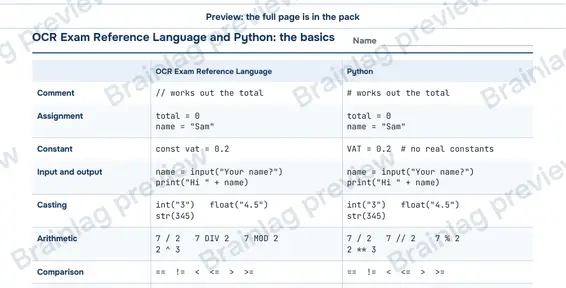
- Casting changes a value's type: str(7) gives the text "7", and int("42") gives the number 42.
- String
- A string is a data type for text; joining two strings with + sticks them together, so "4" + "5" is "45".
- Variable
- A variable is a named place in memory whose value can change.
- Constant
- A constant keeps the same value for the whole run, such as const VAT_RATE = 0.2, so the value cannot be changed by mistake.
- DIV
- DIV gives the whole number part of a division: 17 DIV 5 = 3.
- MOD
- MOD gives the remainder of a division: 17 MOD 5 = 2.
- AND (Boolean operator)
- AND is a Boolean operator that is true only if both sides are true.
- OR (Boolean operator)
- OR is a Boolean operator that is true if either side is true, or both.
- NOT (Boolean operator)
- NOT is a Boolean operator that flips true and false.
- If (statement)
- An if statement chooses which code runs: the conditions are checked from the top and the first true one runs.
- Count-controlled (loop)
- A count-controlled loop, such as a for loop, runs a set number of times.
- For (loop)
- A for loop is count-controlled: for i = 1 to 5 runs with i = 1, 2, 3, 4, 5, both ends included.
- Condition-controlled, checked first
- A condition-controlled loop checked first, such as a while loop, checks its condition before each pass, so it might not run at all.
- While (loop)
- A while loop is condition-controlled and checks its condition before each pass, so a while loop might not run at all.
- Condition-controlled, checked last
- Condition-controlled, checked last, means the body runs and then the condition is checked, so the body always runs at least once.
- Repeat until (loop)
- A repeat until loop runs its body, then checks, so it always runs at least once; Python has no repeat loop.
- Malware
- Malware is software written to cause harm or to steal.
- Social engineering
- Social engineering tricks people into giving away information or access.
- Phishing
- Phishing is fake emails or texts that look genuine and push you to click a link or give details.
- Blagging
- Blagging (pretexting) is inventing a story, often by phone, to get information.
- Shouldering
- Shouldering is watching someone type a PIN or password.
- Brute force (attack)
- Brute force is trying every possible password, or a list of common ones, until one works.
- Denial of service (DoS)
- Denial of service (DoS) is flooding a server with requests so real users cannot get through.
- Distributed (DoS)
- A distributed DoS floods a server with requests from many computers at once, often a botnet.
- SQL injection
- SQL injection is typing SQL into an input box on a site that puts input straight into its database queries, so the extra code runs.
- Data interception
- Data interception is capturing data as it travels, for example with a packet sniffer on open Wi-Fi.
- Validation
- Validation checks that input is sensible before a program uses it, but cannot check that the data is true.
- Range check
- A range check is a validation check that a number is between two limits, such as a month from 1 to 12.
- Length check
- A length check is a validation check that text has an allowed number of characters.
- Presence check
- A presence check is a validation check that something has been entered at all.
- Format check
- A format check is a validation check that text follows a pattern, such as two letters then three digits.
- Type check
- A type check is a validation check that the input is the right kind of data, such as a whole number.
- Authentication
- Authentication checks that a user is who they say they are, usually with a username and a password.